
Executive Summary
The U-fund website we created is for the Sleep In Heavenly Peace organization. SHP is a non-profit organization that builds and delivers beds to children who don’t have any. Needs include: bedding, mattresses, volunteers, wood, nails, pillows, delivery drivers, delivery dates, etc.High Level MVP Features
We had Helper and User authentication meaning that depending on the username the user signed in with the application would redirect the user to the proper page and have the proper permissions.A Helper would be able to:
- View the needs list
- Search within the needs list
- Add needs to their funding basket
- Remove needs from their funding basket
- Checkout the needs in their funding basket
An Admin would be able to:
- View the needs list
- Search within the needs list
- Add new needs to the needs list
- Delete needs from the needs list
- Edit needs in the needs list
There would also be data persistence meaning that all changes made to the cupboard and all helper's funding baskets would be saved and preserved throughout user sessions and across all users.
We also had a few enhancements including adding due dates for needs, filtering the list, sorting the list by date, and having a schedule view of dates in chronological order. These were for the 10% enhancement part of this assignment.
Due dates: Needs now have an optional due date. The date must be a real date. There is also an
OVERDUE status based on if the date had passed or not. If there is no date then the
default status is not overdue and the date section is blank.
Sorting: The user is able to sort the needs in the list view from earliest to latest or
latest to earliest. All needs without dates are automatically sorted to the bottom of the view. This is
so
users can see which needs need the most attention first and if there are any overdue needs they can sort
them
and see them right at the top.
Filtration: We decided to have the option for users to filter the needs on whether they
have
a date or not. This would be useful to see if there are needs that need to be prioritized due to their
time constraints.
Schedule: Users have a schedule view where they can see the needs with dates
in chronological order and with some basic information about them. This is a separate page but it does
not
allow access to a helper page to an admin page or vice versa even though they both access the same page.
This page also lists needs with the same date in one section for a better experience.
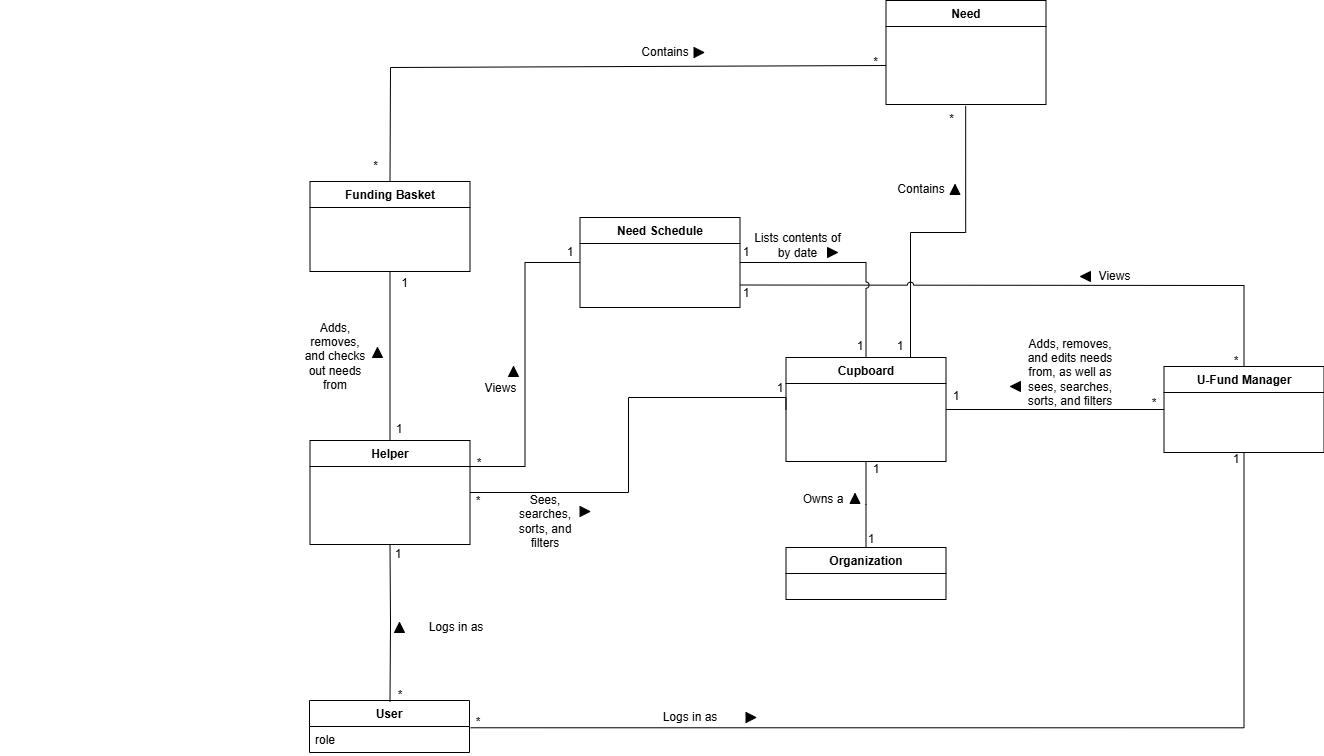
Domain Model
Architecture
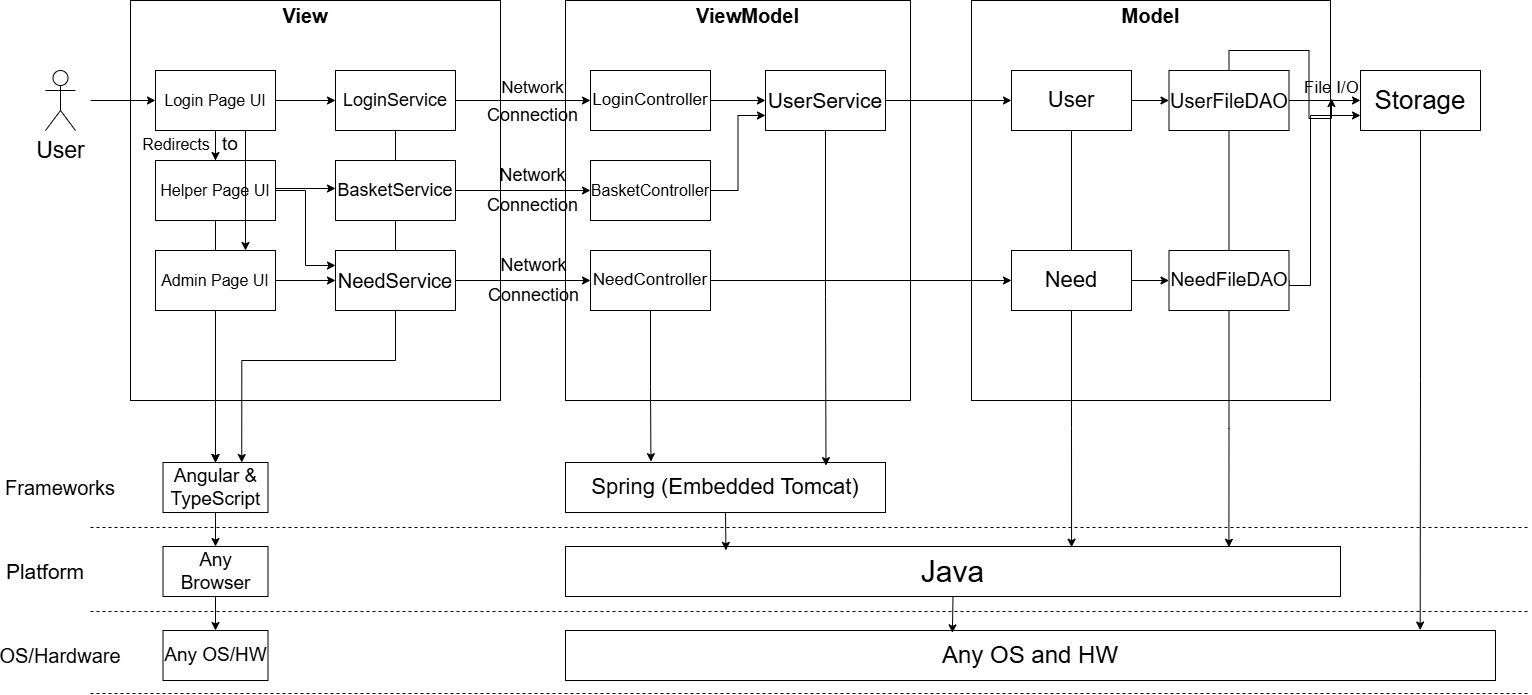 The web application is built using the Model-View-ViewModel (MVVM) architecture pattern. Each layer
represents tiers that it will run on (e.g. NeedController runs on Spring Boot).
The web application is built using the Model-View-ViewModel (MVVM) architecture pattern. Each layer
represents tiers that it will run on (e.g. NeedController runs on Spring Boot).
The View knows about ViewModel, the ViewModel knows about the Model in that order. User is able to interact with the web UI (View) The web UI’s services interact with the controllers which are the ViewModels. The ViewModel Interacts with the Model that accesses the storage.
This allows us to separate the concerns of each View, ViewModel and Model into three different responsibilities:
- The View is responsible for rendering, displaying the information to the client.
- The ViewModel is responsible for processing the requests and serving to those requests submitted by the View (Client).
- The Model is responsible for storing and caching the data from/to the storage, as well properly referencing each one of them for the ViewModel to be able to retrieve/access necessary information to process its business logic.
So, why is this good for maintenance?
- Having an architecture helps developers to distinguish different areas of responsibility, thus allowing us to construct a proper project tree/file structure.
- We can use different frameworks, libraries and even different machines/OS for each category (its tiers). Allowing for flexibility in design.
- Allows developers to continue expand and experimenting with their design in different areas enabling software development life cycle to continue without interruption.
- As the application size grows, the team can decide to split different roles/area of focus to work on. (e.g. front end developers focus on view and back end developers focus on ViewModel/Model).
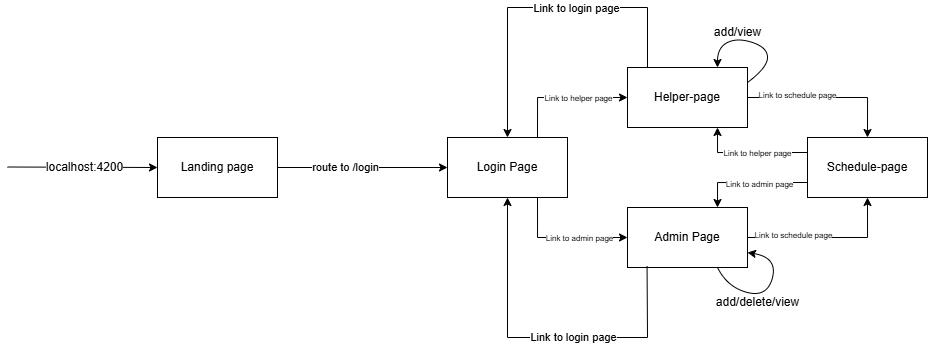
Page Subview Hierarchy
Static Code Analysis
For this project we also used SonarQube to do a static code analysis to help improve the readability, security, and efficiency of our code. SonarQube suggested overriding and providing hashCode method. Java relies on hashCode() for data structures like HashMap and HashSet. When using equals, we should also make sure the hashCode is the same Reason? this is to prevent cases where objects with the same attributes but different hashCode values might be treated as equal. Effectively, this helped our team to learn from our mistakes.Team Rationale
There were some interesting things we did as a team:- Decision making: For decision-making we used Slack if it wasn't a significant change or if we were just looking for advice. For larger decisions like choosing our 10% enhancements were dealt with in group discussions in-person to ensure that everyone on the team was on the same page. We were also able to utilize different group problem-solving techniques like compromising or consensus.
- Usage of utility files: During development, we realized that there were some shared functionality between different components. One of these shared functions was sorting by date, as the actual sorting function used it and also the schedule. We wanted to reduce redundancy and avoid unnecessary coupling. To achieve this, we created a new util file that stored several methods that could then be imported by several pages. This change allowed us to adhere to the reusability, single responsibility,and pure fabrication object-oriented design concepts.
- Moving Schedule: We initially had the schedule on the main admin and helper pages but then realized that it made the design too cluttered and clunky. We moved the schedule to a new page and was able to maintain a simple and accessible design without risking security issues.
- Removing time: Mid-dev, we also changed date and time to just date. We encountered some problems with pre-population, and it simplified the debugging process. We concluded that time wasn't necessary to the functionality as much as dates were.
Future Usability Improvements
- Add verification steps to prevent weird potentially accidental (but valid) inputs (typos, invalid dates, etc).
- Move and status messages to a consistent designated location.
- Add quick jump links to elements in the schedule for easier editing by admins.
- Include an instructional page displayed to newly registered user accounts